Glowing Ores

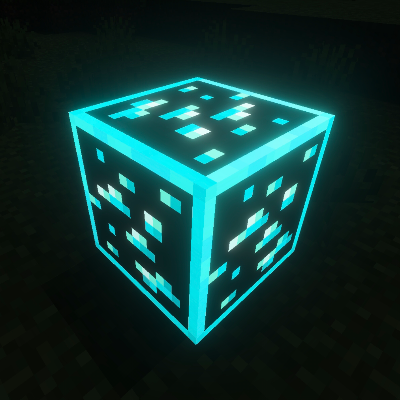
Pack Description

Glowing Ores is a texture pack that makes all ores emit a gentle glow, making them easier to find while mining. It enhances visibility in caves while keeping the original Minecraft style.
Benefits:** You can easily find ores without using torches or night vision. Perfect for mining and exploring dark areas with improved visibility.
Subpacks Included:**
- Outlined Ores: Adds a clean outline around each ore for better visibility.
- Outlined Ores Glow+: Same as outlined version but with a stronger glow effect.
- No Outline Ores: Keeps ores in their normal shape but adds a smooth glow effect.
- Animated Glowing Ores: Adds a dynamic, moving glow effect to the ores for a more immersive feel.
Compatibility:** Works smoothly with most vanilla-style texture packs and doesn’t affect other blocks or performance.
Important: To use this pack, make sure Vibrant Visuals are turned ON in your game settings. Without this, the pack will not work properly.
Community Comments0
Join the community conversation
Log in to comment and ask questions.
No comments yet
Share your thoughts with the community!
1-Click Direct Download
No ads or annoying link shorteners
How to install Glowing Ores in Minecraft Bedrock
- 1. Direct Download
Click the download button to get the .mcpack file directly with zero link shorteners.
- 2. 1-Click Import
Open the downloaded .mcpack file; Minecraft Bedrock will launch and import the pack automatically.
- 3. In-Game Activation
Go to Settings > Global Resources, select the pack under "My Packs", and click Activate.